


This Slim SEO review covers all aspects of the top SEO plugin for website owners. Slim SEO is an all-in-one, automatic WordPress SEO plugin that generates XML sitemaps, schema, and meta tags. It’s ideal for those who want things to be simple. Slim SEO Pro makes SEO easier by creating schemas and managing and optimising links. It builds schemas and connects them into a single graph. Let us learn how to fix SEO problems with the Slim SEO plugin for WordPress sites.
We also troubleshoot Slim SEO problems and how to fix them instantly and rank higher on search engines. Let us fix our SEO with this top SEO plugin.
Slim SEO has emerged as a popular solution for WordPress users wanting a simplified optimisation tool that accomplishes important duties without complex customisations. This thin SEO plugin distinguishes itself in a congested market by concentrating on automation and speed, making it excellent for newbies and performance-conscious site owners who seek solid results with minimum input.
As search engines and generative AI tools become better, plugins like this one will help sites rank well in both old-school and new-school ways. A lot of website owners have trouble with tools that are too big and slow down their websites while promising a lot of capabilities.
Slim SEO fixes this by automatically providing basic features when you turn it on. This thin SEO tool makes sure that your blog, company site, or online shop receives the technical support it needs to do well in search results.
Get 50% Discount
Slim SEO pro is the light of search engines
What Is Slim SEO?
Slim SEO is a free WordPress plugin that automates important parts of search engine optimisation as soon as it is installed. It was made with the idea that you can “set it and forget it”, and it works well with WordPress without users having to deal with complicated dashboards or switch between a lot of choices.
The plugin’s main job is to manage meta tags, structured data, and site mapping in the background. It makes good titles and descriptions depending on your content, adds tags for sharing on social media, and makes links that assist search engines figure out how your site is set up.
This method is very tempting to those who would rather generate content than spend all day changing settings. The plugin’s codebase is kept small on purpose, usually around 100KB, which makes it load quicker than bulkier options. It stays compatible with the most recent versions of WordPress thanks to regular upgrades that offer useful features without adding extra weight.
Slim SEO Benefits for Website
There are several benefits to using a lightweight solution like this on any WordPress site. First, it uses a lot fewerin figuring resources, which speeds up page loading and makes the entire user experience better.
Speed is still a major component in search engines; thus, sites that load faster tend to rank higher. Another big benefit is that it doesn’t need any work. When you turn it on, it takes care of everyday duties that many people forget about, including adding the right robot directives or stopping problems with duplicate content.
This automation takes care of maintenance all the time, which gives you more time to create content and promote it. When this plugin is used, sites frequently have cleaner code output with fewer problems caused by scripts that compete with each other.
It works well with most themes and builders, so you won’t have to deal with the compatibility problems that come with more feature-rich choices. For bigger sites with thousands of pages, the improvements in server speed and simplicity of maintenance are even more obvious.
Slim SEO Benefits Using AI
The main plugin is more focused on automation than AI, although its smart design works well with AI-driven processes. A lot of modern content producers utilise generative tools to rapidly make drafts, and a simplified optimiser makes sure that such pages get the right technical treatment without any extra labour.
The plugin’s autonomous processing of structured data is similar to how AI search engines understand material. It helps AI algorithms understand page topics and entities better by making clear schema markup the default.
This functionality is becoming more and more useful as generative search experiences get information from sources that are well organised. Users that use this product with AI writing assistance say that things go more smoothly since they don’t have to change or override parameters that could mess up the material that is created. The end consequence is that posts are published more quickly and are always optimised.
Slim SEO Benefits WordPress
WordPress runs millions of sites, and this plugin adds to what the platform can do without getting in the way of what it already does. It keeps important elements like title tags while adding things like social information and feed security where they are needed.
Its minimal overhead is particularly helpful for multisite deployments since it keeps performance up across networks without using up too many resources. Developers like how it doesn’t include any unnecessary database queries or frontend elements that may mess up bespoke implementations.
The plugin also has some nice features, including automatically adding alt text to images as they are uploaded. This makes images easier to find and use. These little things that make a big difference make WordPress blogs better right away.
Slim SEO Features New
Recent upgrades have included various practical enhancements that boost use without cluttering the interface. One new feature is that important Google Search Console metrics are now available directly in the WordPress dashboard, so you can check performance quickly without having to switch tools.
Another new feature is a writing assistant that gives you real-time suggestions for keyword use, readability, and linking as you write posts. This lets producers improve material organically throughout the writing process.
Enhanced dynamic variable assistance for meta elements allows additional freedom in building titles and descriptions that draw from custom fields or other data sources. These modifications retain the plugin’s lightweight ethos while answering typical user demands.
Slim SEO Features Free Version
The free plugin does a lot for nothing. When you turn it on, it generates correct meta titles using post titles or custom patterns if you require them. Descriptions intelligently draw from text samples or the initial paragraphs.
For better previews when sharing on social media, Open Graph and Twitter Card tags show up automatically. Robots meta takes care of indexing directives, which avoids problems with archives or attachment pages.
Canonical URLs quietly get rid of the possibility of duplicating material. The plugin adds rel=next/prev for paginated series and preserves RSS feeds by linking back to the source entries.
You can make breadcrumbs with a simple shortcode or block, and you may change them using hooks. By default, XML sitemaps contain articles, pages, categories, and authors. Image attachments are included when they are needed.
Basic schema markup creates a graph that connects organisations, websites, web pages, articles, and breadcrumbs. Search engines can quickly comprehend how a site is set up using this JSON-LD output.
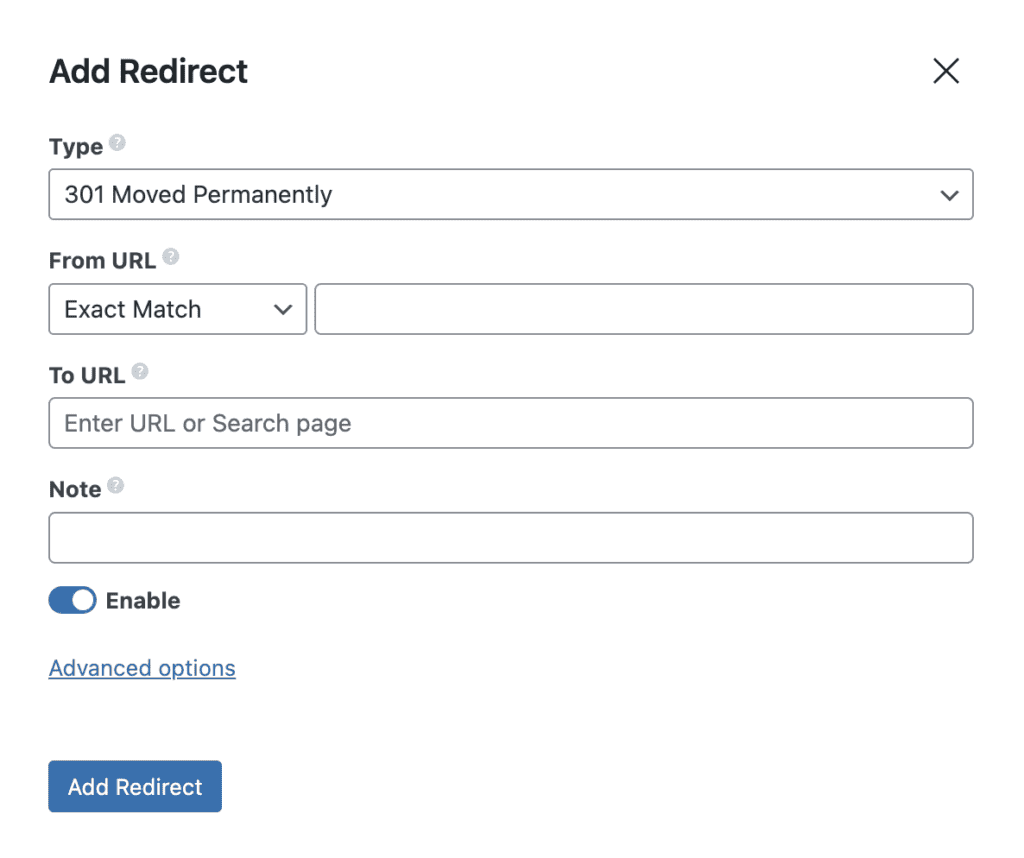
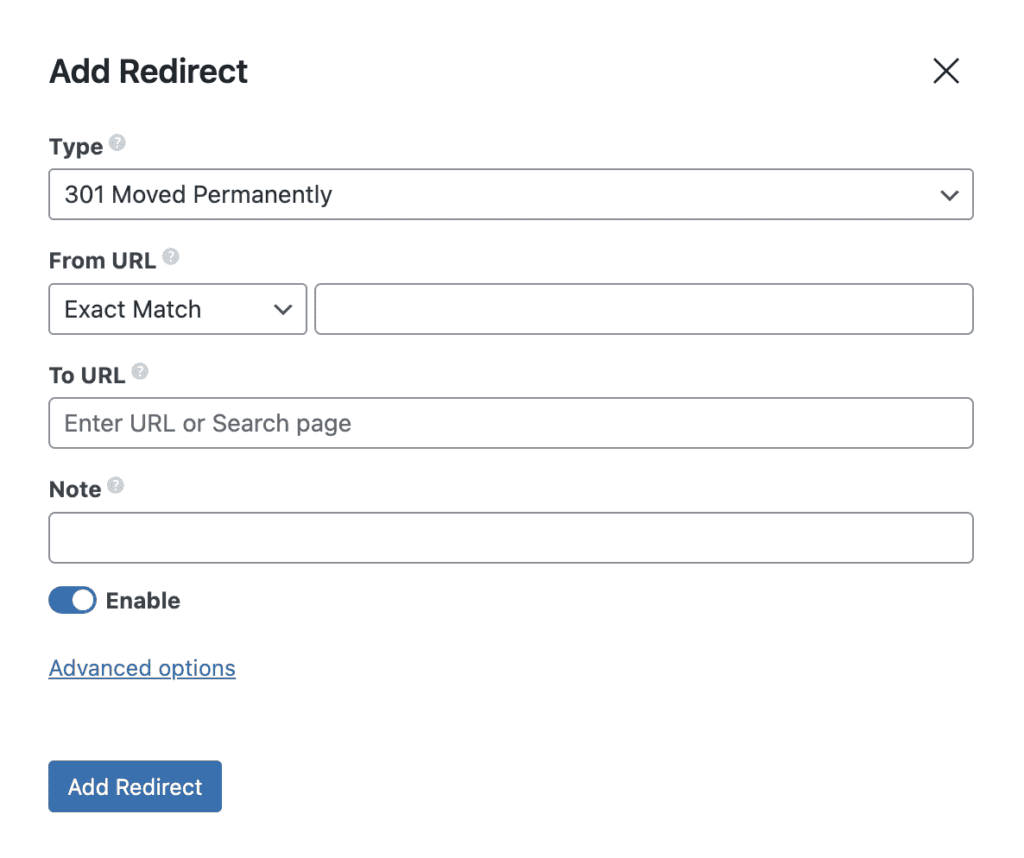
Redirection management keeps track of 404 failures and makes it easy to set up 301 redirects using a simple UI. Adding verification programmes or analytics is easier with header code insertion.
Download Slim SEO Free Version
Do not be left out, Known in the search space using this free plugin. It is the best light weight SEO plugin, not bloated and heavy than Yoast or Rankmath
What Changes with the Slim SEO Premium Plugin?
When you upgrade to Slim SEO Pro, all of the advanced features are combined into one activation. Add-ons for schema and link management that used to be distinct are now bundled together, leaving flexibility for future improvements like AI help or deeper connections.
The premium layer maintains performance while adding more flexibility. It works with the free core or even additional SEO plugins if you like, so there are no problems. Prices start low for single sites and go up for agencies.
Depending on current offers, you may choose between yearly or lifetime plans. The investment is aimed at consumers who require professional-level control instead of just basic automation.
Advanced Schema Features in Premium
The free version has good default structured data, but the Pro edition adds a visual builder for new kinds. Users may create recipes, events, goods, FAQs, reviews, and many other things by dragging and dropping.
Dynamic values come from custom fields and work with popular plugins like ACF or Meta Box. Conditional rules only apply schema to certain articles or categories.
This functionality makes it feasible to have more than one entity on a page and to have nested attributes for more complicated setups. This level lets you use rich snippets that greatly increase click-through rates.
Connections go beyond the fundamentals, creating comprehensive knowledge graphs that current search algorithms like. Testing tools Check the output before it goes online.
Link Management Tools Exclusive to Pro
Real-time monitoring gives your internal linking strategy a big boost. While you edit, the plugin looks for changes in the material and provides appropriate anchors. Broken link detection runs all the time and lets administrators know about problems caused by removed pages or problems on other sites.
Bulk updates make it easy to change domains or restructure URLs. External links also get attention, and rules automatically apply nofollow to them. Reports keep track of how links are used across the site.
These tools save a lot of time compared to checking things by hand, particularly on blogs or online businesses with a lot of information.
Slim SEO Additional Premium Enhancements
Recent improvements to Pro add important data from Google Search Console right to the dashboard. This gets rid of the need to switch tabs to get performance data.
Writing help shows up in a subtle way while you’re writing, offering ways to make things better without using harsh grading systems. Rel attributes control add tags for sponsored or user-generated content where they are needed.
The vision for the future suggests that there will be greater automation in tools for optimising and moving information. The modular architecture makes sure that new features may be added without slowing down current installations.
Who Benefits Most from Each Version of Slim SEO?
The free plugin is great for novices, hobby sites, or anybody who is sick of heavy alternatives. It takes care of 90% of SEO tasks on its own and works well with content strategies that are concentrated.
For agencies, WooCommerce stores, or newspapers that want rich results, Premium is the way to go. The best results come from sites that use specific post types or a lot of structured data.
A lot of people start out for free and only pay after they hit certain limits. This scalable method makes sure that expenses stay in line with what is really needed.
In reality, using both together makes a powerful combination that is still lighter than most all-in-one rivals. The free foundation is still strong, and the premium extensions do a great job of meeting specific needs.
Slim SEO Features Schema
Structured data is very important for search engines to provide rich results, and the basic plugin comes with a good default implementation. It makes linked schema graphs for organisations, websites, webpages, articles, and breadcrumbs on its own.
The output is in a single, efficient script tag that meets JSON-LD standards, so there is no extra markup. Search engines can quickly read a knowledge graph that is made up of connections between items.
A specialised add-on with a visual builder and templates for hundreds of entity types is available for more complex requirements. This lets you map properties in your own way, get dynamic values from fields, and set rules for when to use them.
Slim SEO Sitemap
When it’s appropriate, XML sitemaps automatically create photos and news variations. Standard URLs are used to submit to search engines. Customisation options let you choose which post types or taxonomies to include.
For optimal compatibility, the format follows the most recent protocol standards. Updates quickly show changes to the material without having to be manually regenerated.
The usual plugin installation method makes setup quick and easy. Activation starts the process of optimising all current material right away. You may fine-tune breadcrumbs, feeds, or code insertion as desired with optional parameters.
Migration tools make it easy to import data from well-known rivals. No required setup means that locations may start using the benefits right immediately.
Slim SEO Automated Redirects
One of the worst things about automated systems is that there are instances when I want the plugin to perform things differently. The plugin’s automated redirect functionality is a nice illustration of this problem. The plugin will send all views of attachment pages to the media file by default. If the author hasn’t published any articles or if the site is just for one author, it also sends users to the home page from author archive pages.
Some end-users may like these automatic redirections, but I don’t. The difficulty is that there is no apparent method to turn off this functionality, even using code.
Cleaning Up the Header
The plugin also includes a “cleanup” option that automatically takes off the RSD link, Windows Live Writer manifest link, WordPress version number, and post shortlink from the <head> region on the front end. You could want to get rid of such things, but a cleaning WordPress plugin would be a better place to do so than an SEO-focused plugin.
Automatic Alt Attributes for Images
When you add photos to the editor or post thumbnails, Slim SEO automatically inserts the alt attribute. The issue is that it utilises the title of the attachment. This might make things harder to get to than just keeping the alt property blank. If the title of your attachment is PX_IMG10053.jpg, it doesn’t really describe a picture.
Slim SEO Breadcrumbs
The plugin contains a shortcode that makes breadcrumbs. It has to be inserted by hand into a shortcode-aware section or into a theme template.
The breadcrumbs feature gives you a basic experience. It doesn’t work for every situation, or even most of them. The function won’t help you much with really complicated setups. But that would be fine for the usual installation.
That’s how SEO plugins work: they give you breadcrumbs that aren’t very good. To be honest, SEO plugins should stop including breadcrumbs in their features and allow full-fledged breadcrumb plugins to do their job. Users should choose a plugin that is especially made to be a breadcrumb plugin. People who write such kinds of things usually have greater familiarity with edge situations.
Download Slim SEO pro
Get top results with this SEO lightweight WordPress plugin. Download this WordPress SEO Slim plugin and rank higher today.
Slim SEO Features to Use
A few great features make everyday management simpler. The redirection manager makes it easy to deal with 301s, 404s, and permanent removals with the right status codes.
Breadcrumb navigation is automatically created with choices for how it looks, which makes it easier for users to find their way across deeper sites. Enhancements to RSS feeds include links to the source to stop scraping while keeping the feed legitimate.
Adding verification tags or analytics scripts to the header code makes it easier to do so site-wide or on individual pages. These useful features meet frequent demands without making the admin area overly busy.
Slim SEO Setup Steps Free and in Premium Plugin
Getting started with Slim SEO setup procedures is quite easy, whether you use the free version or the paid plugin. This is in contrast to other, bigger options.
This lightweight WordPress solution turns on important optimisations right away, so most users may get good technical SEO without having to change any settings.
The approach is on speed and automation for blogs, commercial sites, or complicated multisite networks, whether you continue with the entirely free core version or upgrade to premium features.
A lot of site owners like that the plugin doesn’t include confusing wizards or infinite toggles from the start. The free version takes care of meta tags, sitemaps, breadcrumbs, and basic schema on its own.
The premium extensions include sophisticated schema creation and link management when you need them. This guide makes it easy to see what works best for your process at each phase.
Installing the Free Slim SEO Plugin
To get started, log in to your WordPress admin and go to Plugins > Add New. Find the official eLightUp plugin by typing “Slim SEO” into the search box and then clicking “Install Now”.
When you’re done, click Activate. That’s all you need to do for the basic functionality to start working. There is no setup wizard since one is not required.
The plugin immediately begins generating clean meta titles from your post titles and site name, descriptions from content snippets, and an XML sitemap that can be seen at yourdomain.com/sitemap.xml.
You may check to see whether Open Graph and Twitter Card tags are already in place by looking at the source code of any site. Send the sitemap URL to Google Search Console and Bing Webmaster Tools to quickly ensure that it has been indexed.
Configuring Basic Slim SEO Free Version Options
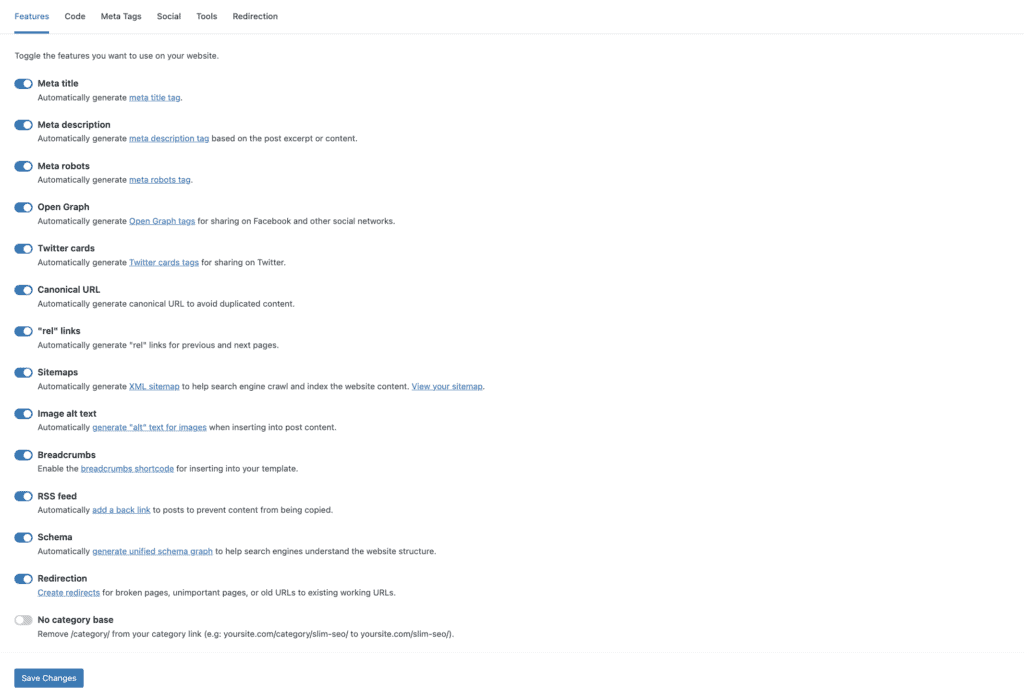
After activation, there is just one settings page under Settings > Slim SEO, even though automation takes care of most duties. Here are simple parts for making basic changes, changing the breadcrumbs, protecting the feed, and adding code to the header and footer.
You may turn features on and off as you choose. For example, you can use the the below shortcode or Gutenberg block to turn on automated breadcrumbs.
[slim_seo_breadcrumbs] You may quickly add Google Analytics or verification codes to the right places without having to change any theme files. The design remains neat, and each choice comes with excellent explanations.
If core WordPress sitemaps are turned on, turn them off to avoid problems. However, the plugin does this automatically by default. Changes take effect right away on the whole site when you save them once.
Editing Individual Post Meta in the Slim SEO Free Version
When you write articles or pages, a little Slim SEO meta box shows up underneath the editor. If you think that certain wording works better for particular information, you may change the automated titles and descriptions here.
You may create your own social sharing pictures, change robot settings like noindex or nofollow for private sites, or manually specify canonical URLs. These overrides just change the current item and don’t change global automation.
The box stays out of the way and folds up when you don’t need it, so you can concentrate on your work. When it’s appropriate, comparable controls show up on the edit screens for archives or taxonomies.

Activating and Setting Up Slim SEO Pro
Slim SEO Pro is a standalone plugin that works with the free version of Slim SEO Pro. Premium features are now included in Slim SEO Pro. Buy a licence from the official site, download the zip file, and then go to Plugins > Add New > Upload Plugin to upload it.
Once you’ve activated Slim SEO Pro, go to the new settings page and input your licence key. The plugin combines meta boxes in a way that makes sense, offering sophisticated tabs without making the UI seem cluttered.
Pro adds a visual schema builder that you can go to from a separate menu. Make your own structured data types using drag-and-drop features, and easily map dynamic values from custom fields or post data.
Advanced Schema Setup in Premium
The schema part stands out as a big incentive to upgrade. To begin, create new schema entities for each custom type your site utilises, such as recipes, events, items, or anything else.
Choose the requirements for the application, such as certain post kinds or categories, and then fill the properties with static text or dynamic tags that come from ACF, Meta Box, or native fields.
Check the JSON-LD output right away to make sure it’s accurate. Connections between things are made automatically or by hand to make knowledge graphs more complete. Google reliably checks these structures, which typically leads to better rich results quicker than coding by hand.
Get 50% Discount on Slim SEO Pro
Number one automated SEO plugin. Not complicated. It is like plug and play.
Link Management and Redirections in Pro
Another great premium tool takes care of both internal and external connections in great detail. From a single dashboard, you can see the status, anchor text, and destination pages of all the links on your site.
Set up automated recommendations for internal links as you write material, or make adjustments to all of your articles at once. Find broken links before they happen with scheduled scans and one-click repairs.
Redirection management becomes a lot bigger, with support for regex patterns, 404 tracking, and extensive logging. You may import data from other plugins or CSV files during migrations without losing any data.
Migration and Compatibility Tips
Going with Slim’s built-in migration techniques makes SEO problems quite unlikely. The plugin finds prominent competitors and lets you import metadata during setup if you want to.
Make sure that content appears correctly for description generation to test interoperability with page builders like Elementor or Bricks. If you use WPML or Polylang to make your site multilingual, you don’t have to do anything more to get hreflang tags.
After making big modifications, clear your caches and send your sitemaps back to the search consoles. Keep an eye on Google Search Console for any validation warnings, although they don’t happen very often if everything is set up correctly.
Slim SEO Features UI
The user interface puts clarity and simplicity first. There is just one settings page with the most important toggles, so there are no nested menus or confusing tabs. When you need it, meta editing shows up in a little box below the content editor.
This keeps the writing screen clear. Dashboard widgets are not there on purpose, so they don’t get in the way. This clean method is appealing to users who are sick of plugins that take up a lot of screen space with ads or complicated wizards. Everything remains out of the way until you need it.
Slim SEO Keywords
The plugin doesn’t do keyword research as its main job, but it does let you use focus keywords in meta elements if you want to. Automatic generation draws pertinent phrases from material in a natural way.
When you combine it with content analysis, it helps you find chances as you write. It works nicely with specialised tools for further investigation without causing any problems. Smart defaults that prevent cramming while keeping relevance are how to use keywords correctly.
Slim SEO Optimisation Tool
It is a great optimisation tool for technical underpinnings that help with bigger plans. Managing robots, canonical tags, and clean URLs all help avoid frequent problems without anybody knowing. Social media previews make nice cards with the right pictures and wording.
Together, these parts provide a strong foundation for any optimisation effort. The plugin makes regular audits easier since it doesn’t cause issues that need to be fixed later.
The plugin is free to download from the official repository and has over 50,000 active installs. It gets regular favourable reviews for being reliable. As formal documentation develops, so does community support. Compatibility includes well-known page builders and e-commerce sites.
Updates are mostly about making things more stable and making sure WordPress core is in sync. The development team has an active plan that takes into account the genuine demands of users.
Slim SEO Pricing
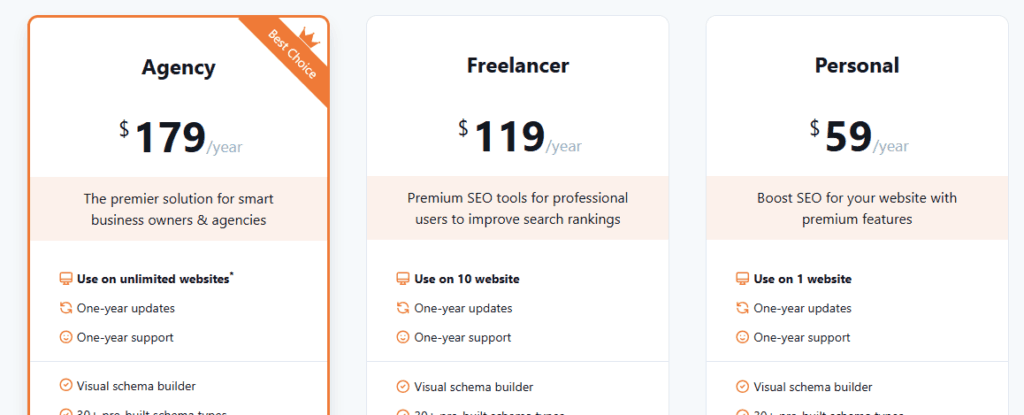
The basic plugin is still free, and you won’t get any annoying upsell messages while you use it. Premium extensions come together in a Pro version with different plans. Personal licences are good for one site, freelancer plans are good for up to ten sites, and agency plans let you use them as many times as you like. The price reflects the importance of sophisticated features like link management and constructing visual schemas. Existing lifetime buyers have upgrade pathways that respect their past purchases.
Slim SEO Pro Lifetime
The old lifetime offers become part of the new Pro package, which still lets anyone who bought them before access. Current options rely on yearly memberships with significant site allowances. The change combines functionality into one activation to make administration easier. Active licences still get support and updates.
Slim SEO Reviews
User reviews often appreciate how fast the plugin makes things run and how easy it is to use. Many people move from heavier options because they perceive a big difference in performance.
Beginners like that there isn’t a learning curve, while experienced users like that the implementation is tidy. Most review sites provide good ratings. When people ask for additional built-in metrics, it’s straightforward to add them via third-party connections.
Slim SEO Common Troubleshooting During Setup
Sometimes, themes that produce duplicate schema cause problems. Slim SEO automatically finds and removes the markup for several well-known ones, like Astra or GeneratePress.
Check the positioning of the shortcode or block in your template if breadcrumbs don’t show up appropriately. If you’re having problems with your sitemap, make sure no other plugin is creating files at the same URL that are in conflict.
Premium members may get help quicker by contacting support directly via the account site. WordPress.org’s community forums are very good at answering issues about the free version.
In fact, it takes less than 10 minutes to set up these compact SEO procedures for most installs, whether they are free or paid. The free version has all you need to get good results on smaller sites, while the Pro version works well for agencies or platforms with a lot of content that require advanced schema and link management. A lot of people start out for free and only upgrade when they require more sophisticated features, but they still have the same lightweight basis.
Slim SEO vs Rank Math
Rank Math has a lot of features, such as built-in analytics and content AI, that make it desirable to those who want everything in one place. But this level of detail makes the file bigger, which might slow down download speeds on certain servers.
In independent testing, Slim SEO puts the most important automation first and has the best speed metrics. People who want the best performance frequently like its simple design more than its many components.
Both do a good job with the main jobs, but which one you choose depends on whether you need greater breadth or more efficiency in your work.
Slim SEO vs SEO Framework
Both plugins are lightweight and have great performance features. SEO Framework has a few extra built-in options for configuring. Slim SEO focuses on full automation with fewer choices to make.
It has an advantage in complicated schema situations since it can be extended. There is some overlap between communities of users that prefer either for bloat-free functioning.
Slim SEO vs SEOPress
SEOPress has a lot of great free features, such as support for local business schema and WooCommerce. Its UI gives customers a good mix of choices without being too much for most people.
Slim SEO fights back with a smaller footprint and automatic settings. Premium extensions have the same or better specialised features. Sites that concentrate on performance almost always tilt towards the leaner choice.
Slim SEO vs Yoast
Yoast has the most market share because content teams prefer its detailed guides and readability analysis. Its premium edition gives you access to more sophisticated redirection and ideas for internal linking.
Slim SEO is for those who think that Yoast’s interface is too busy or uses too many resources. Automation does the same duties with a lot less overhead. There are ways for consumers to go to a simpler stack.
To sum up, this plugin is a smart choice in the world of WordPress SEO. Its focus on simplicity and efficiency appeals to an increasing group of people who are sick of feature creep.
The automated method works well for both administering one site and multiple sites, and it keeps costs low. As web standards change, site owners who are practical will probably start to choose technologies that accomplish more with less.