

So, you just type your search query into Google. Then, you notice a bunch of business websites popping up on the search engine results page (SERP). The benefits of search engine positioning extend far beyond just mere visibility in online searches. So, now you’re probably thinking, “How can I grab one of those top spots for my own site?”
This is where search engine positioning plays a role.
So, what exactly is search engine positioning?
Search engine positioning, also sometimes called SEO positioning, is an integral part of SEO that is critical and matters a lot.
Search engine positioning is all about fine-tuning your pages or posts on your website so they can rank better and higher in all search engines. It really boosts your brand visibility and helps you draw in more organic traffic.
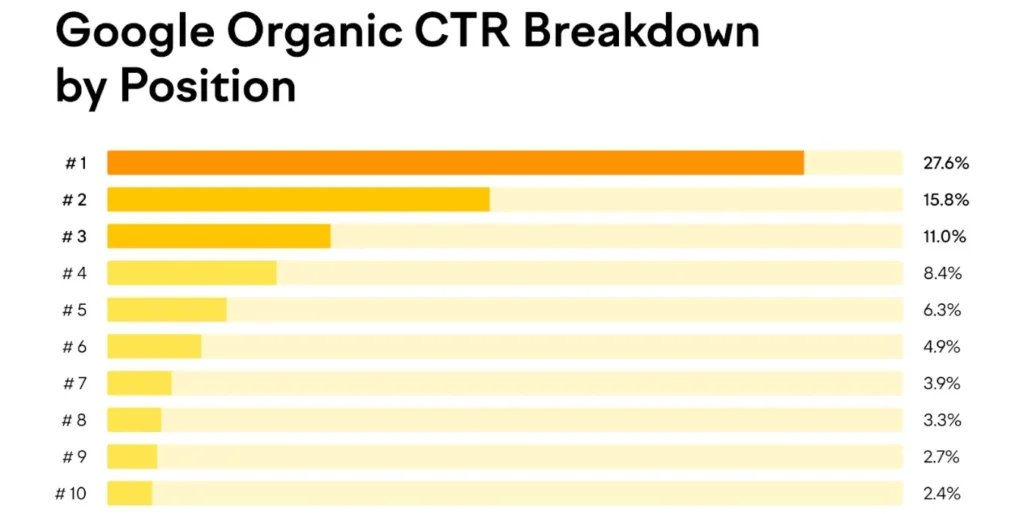
People tend to click on the listings that are at the top of the first page of search results more often. Did you know that experts at FixBlogs discovered that the top three results on Google snag about 54.4% of all clicks? Pretty interesting, right?
Not many people tend to click on the results that are lower down on the search engine results pages. So, the top result grabs around 27.6% of all the clicks, while the 10th one only gets about 2.4%.
When someone searches on Google, the search algorithms take a look at all the indexed content to figure out which pages are the most credible and relevant for that specific search. So, those are the pages that you see in the SERP.
When you think of search engine positioning, the move is to raise your content to the top of the list of search engines by improving on factors like:
- Content quality refers to how strategically your content provides value and relevance to the topic being discussed.
- Relevant backlinks are links from different sites, and how many good links are from other websites that connect to your site.
- Mobile-friendliness: How fast your site loads on phones and how easy it is to get around.
- Page performance is all about how quickly the site loads and works for users scrolling through.
Search Engine Positioning Features and Benefits
Why does search engine positioning matter for your business? Getting your search engine positioning right is a key part of SEO.
It makes it easier for people to discover your business when they’re looking for terms and products that relate to what you offer.
If your pages rank higher, your business will be more visible to potential customers. Getting more visibility can really help bring in more traffic and boost revenue.
If you don’t spend time on web search engine positioning, you might find yourself slipping in rankings – and losing business – to competitors who are putting in the effort to get their content seen in those prime spots.
In addition to getting those usual organic results, nailing your search engine positioning can also help you snag a featured snippet. This is a snippet of text that shows up at the top of the search results page.
So, check this out! Here’s the featured snippet for the Google search “how to start a business”. A highlighted answer for the Google search “how to start a business”
These snippets really catch the eye and help your brand come across as a reliable authority. Since featured snippets are the first thing users notice in the SERP, they’re pretty likely to click on them.
So, you’re looking to outshine your competition and rank for those, huh?

Why Search Engine Positioning is a Great Effort
Getting your search engine positioning right is super important for creating a strong online presence.
This is what you get:
Drive Traffic
Improve your website and drive more traffic using these simple search engine positioning techniques and earn.
Improved brand visibility
Getting your web content to rank higher in search engine results can be achieved by optimising a specific page with relevant keywords, enhancing the quality of your content, and boosting the user experience (UX).
So, as we talked about earlier, the higher you are in search results, the more clicks you tend to get.
Increased organic traffic
Getting higher rankings can really boost the organic traffic to your webpages.
Getting your site to rank well on search engines is a smart and budget-friendly way to attract potential customers. So, here’s the thing: with organic listings, you’re not shelling out any cash like you would with pay-per-click (PPC) models. You’re not paying the search engine for those listings, which is pretty great!
Not every visitor to your website is going to make a purchase immediately. Search engine positioning is great because it helps you connect with various potential customers right where they are. It gets your content in front of them, matching their different search intents.
- Navigational: It seems like the person is trying to find a particular page or website. How does the person get to your site?
- Informational: Hey there! It seems like you’re on the hunt for some info about a certain topic. What are you curious about?
- Commercial: The person is looking into different products and services.
- Transactional: When someone is searching, they usually have a clear idea of what they want to buy. They’re on the lookout for specific products and services and are ready to make a purchase.
The searcher intent is either navigational, informational, commercial, or transactional.
This really helps create a genuine connection and build trust between users and your brand, making it easier for them to move along in their customer journey.
A Leg Up in the SEO Game
No matter how specialised your industry might be, you’ll always find yourself competing with other brands for the attention of the same target audience. Only one website can snag that top spot for a keyword.
Spending some time and resources on search engine positioning can really set you apart from competitors who might not be focusing on it as much. If your pages are ranking higher than your competitors’, you’re likely to attract traffic that would have otherwise gone to them.
So, if you think about a dry ice business that delivers to a certain area, they might notice that there isn’t too much competition around.
To really establish itself as the leading brand in the area, it could enhance its service page with some keyword-focused details like:
- Let’s talk about the service details.
- Steps to place your order
- Let’s chat about pricing and payment details.
- Hey there! Just wanted to share some info about quality assurance.
- So, let’s talk about delivery logistics.
- Hey, just a quick note about safety info.
- What are our customers saying?
- Hey, could you share your contact details?
- What are the common questions people ask?
- Lastly, what about calls to action?
If you focus on the right keywords and offer useful information, your dry cleaning business can climb the rankings above competitors who have less substantial content on their service pages.
Imagine you’re an online reseller of Nike ‘Panda Dunks’, which are super popular sneakers right now. The search landscape is super competitive here.
Your Dry Snickers collection page should really stand out and shine where others might not. It seems like they might be missing out on including testimonials or a section for frequently asked questions, and their page speed could use some improvement.
So, you will need to focus on making your page better to tackle these areas of SEO and get ahead of those competitors who have dominated the SERP.
Boosting your brand’s visibility
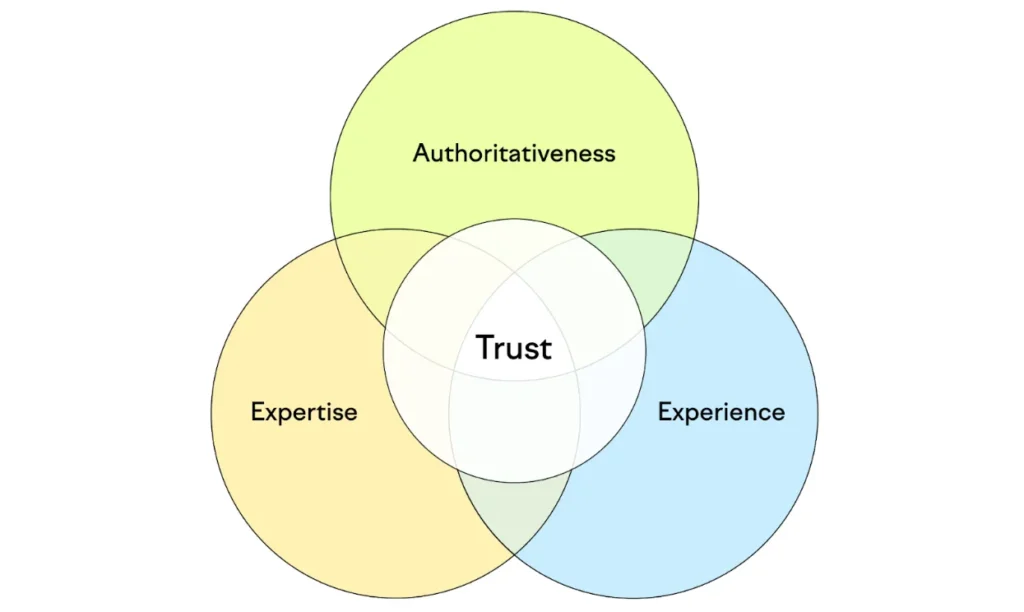
Making content that shows off your experience, expertise, authoritativeness, and trustworthiness is very important to enhancing your worthiness with both Google’s Quality Raters and your audience. This can, in a way, help improve your rankings.
Keeping those top spots really helps you build a solid reputation. When people see your business show up first in important searches, it makes them have the impression that your brand is genuine. That can really make a difference when you’re ready to make a purchase.
Search Engine Positioning and SEO: Let’s Break Down the Differences
Search engine positioning and SEO go hand in hand, but they aren’t quite the same thing.
Primary Attention
SEO is all about boosting your website’s visibility and performance in search results. It’s a wide approach that encompasses everything on your website. It covers numerous areas, such as:
- Looking into keyword research
- Creating quality content
- Good website layout
- Enhanced user experience
- How fast a page loads
- Improving the conversion rate
Imagine you’re running a pet store. Numerous content types, such as landing pages, user testimonials, and blog posts encompassing real trends in animal and pet variety, can help back your SEO. This way, you can bring in a wide audience and make your site the go-to spot for all things pets and other domestic animals.
On the flip side, search engine positioning is a part of SEO that focuses on particular pages, with the goal of increasing their visibility in search results.
So, sticking with the same example, when we talk about search engine positioning, it means you’d want to zero in on a specific collection or product page that you’re looking to boost in rankings, like workout shorts.
If you customise that page with keywords about workout shorts, add some relevant info, link to related pages, and boost its performance, you’re aiming to help it rank well for those specific target terms.
Schedule your SEP and SEO.
SEO is all about playing the long game. It’s focused on boosting your website’s quality, relevance, and rankings over time.
Thus, even Google acknowledges that SEO can take four months to a year to start yielding results. While it may take up to a month for Google to index your website pages, with search engine positioning you can see how they’re doing as soon as a few days have passed.
But that doesn’t really mean your pages will start ranking well right away. You can actually see the effects of any changes you make to your page in just a few days.
If you want to see results faster, you might need to tell Google to index or reindex your page right after you make any changes in your Google Search Console.
If you want Google to re-index your page after making executive changes, just put your page URL into the search bar at the top of Search Console and tell Google to re-index.
Just hit the “Enter” key on your keyboard, and you’ll see the indexing status pop up.
Checking out the page indexing status in Google Search Console
If your page is already indexed, you can still hit “Request Indexing” to let Google know that something has changed and it should crawl your page again.
“Request Indexing” in Google Search Console
Want to learn more? Check out how to get your website indexed by Google!
Tips for Boosting Your Search Engine Rankings
Are you all set to dive into search engine positioning? Let’s chat about some great ways to optimise your pages and boost their rankings on search engines. These tips are designed to help with specific page performance, but keep in mind that some might also tie into your overall SEO strategies.
Make sure to create content that’s high-quality and targeted.
Your page content, whether it’s a landing page, blog post, or anything else, really needs to connect with the topic at hand. It should provide genuine value that resonates with your target audience.
If something isn’t relevant or doesn’t match what people are looking for, Google likely won’t display it on the search results page.
Semrush’s Topic Research tool is a fantastic way to kick off your brainstorming for search-friendly content ideas that really connect with your audience.
Just select a topic and press the “Get content ideas” button.
“Lower body workouts” place it in the Topic Research tool. Next, you’ll now see a dashboard with content ideas that are related:
Just select the “Trending subtopics first” slider to arrange the results by volume.
Also with the monthly search volume, each card provides a clear picture of the topic difficulty and efficiency. Plus, you’ll see headlines of related articles and questions too.
A card that displays headlines, questions, and related searches for “lover body workout gym female”.
Once you’ve got your ideas sorted out, check out our content creation guide for some great tips on making awesome resources for your users.
Update Current Content to stay on top
There are a few reasons why traffic to your content might take a dip:
- Your competitors are stepping up their game and getting ahead of you in search engine rankings.
- Google is always updating its search engine algorithms.
- Your information seems to be outdated or not quite right anymore.
- Take some time to go back and refresh your content that’s slipping in rankings. Make sure it’s still relevant, provides useful info, and aligns with what searchers are looking for.
The SEO Writing Assistant is a breeze for giving your content a fresh update.
First, log into your Semrush account. After that, head over to “SEO Writing Assistant” in the left-hand column. Just click on the “Analyse my text” button.
Finding your way to the “SEO Writing Assistant” in the Semrush dashboard.
So, you’ll check out the scores on your:
- Understanding how easy something is to read
- Search Engine Optimisation
- Being original
- Style of Communication
- I’ve got some suggestions on how to enhance each category.
The SEO Writing Assistant editor has highlighted the content score and the “Smart Writer” section.
If you’re looking to refresh certain sections, just click on “Rephraser” under “Smart Writer” on the right side.
You’ll notice various buttons that guide the AI to:
- Reword your text.
- Make your text easier to read.
- Could you please expand on that? I’d love to see more details or additional information.
- Summarise your text by focusing on the main ideas.
- The “Rephrase”, “Simplify”, “Expand”, and “Summarise” buttons are highlighted in the Rephraser window.
- Review Your Drafts in Real Time
Let’s talk about on-page SEO
So, as we talked about before, SEO is like the big-picture strategy that covers search engine positioning. Plus, when you work on your on-page SEO, it really helps you climb those rankings more easily.
We’re sharing just two easy, beginner-friendly examples of on-page SEO here. If you’re interested, feel free to explore more techniques in our on-page SEO guide!
Try using strategic internal links
Internal links are those hyperlinks on a website that direct you to other pages within the same site.
So, just to clarify, the “internal links” link I mentioned earlier is actually an internal link.
Internal links are a great way to show Google how your content connects with each other. Plus, they help Google discover new pages to index.
Also, internal linking is great for passing on link equity, or that ranking power, from your top-performing pages to those that might not get as many clicks.
This way, more of your content can be seen as authoritative and relevant, which can really help improve their rankings.
Internal links help website visitors discover more relevant content, making it easier for them to navigate. This can expand traffic and position your site as a man on a mission.
Look at these tips for using internal links to keep your visitors engaged on your site:
- Try to use unique anchor text: go for descriptive anchor text instead of vague words like “click here”. This way, readers have a clear mind of what the content is about.
- Keep anchor text short: Aim for about five words to clearly convey the linked page’s topic.
- It’s all about quality, not quantity! Make sure the links you include are important and even helpful for the audience.
- Having too many links on an article can trigger search engines as spammy or confusing.
- Fix broken links: No links should lead to a 404 error (page not found). Fix broken links by changing the destination URL or redirecting it to a live page with a 200 status. Or delete the link.
Make the most traffic from your title tags and meta descriptions
Your title tags and meta descriptions are extremely important, as they act as a link to your audience while providing a snippet of the content while keeping those keywords in mind. The move helps back the website’s organic click-through rate.
Even though your CTR isn’t a direct ranking factor, it’s a useful way to gauge how well your content is doing. If you notice that some topics bring in more traffic than others, it’s a good idea to focus on related keywords.
To make sure your text doesn’t get cut off in search results, try to keep your title tag under 60 characters. Also, aim for your meta description to be around 105-120 characters.
How to Measure Search Engine Positioning Algorithm
Measuring your search engine positioning can be pretty straightforward. You’ll want to keep an eye on where your website ranks for specific keywords.
There are various tools out there that can help you track this, making it easier to see how you’re doing over time. Just remember to check regularly and adjust your strategies as needed!
Check out these two tools for tracking your page rankings in search engines:
Check out Semrush’s Position Tracking.
Position Tracking is a handy tool for keeping an eye on your keyword rankings. It lets you see how you stack up against your competitors in the top 100 spots on Google.
First, just enter your domain and hit “Set up tracking”.
If you’ve got projects already set up in Semrush, just click on one of your existing projects or hit the “+ Create project” button to add a new domain.
Search bar for the Position Tracking tool
Choose the search engine and device you’d like Semrush to track. We suggest kicking things off with “Google” and “Desktop”.
Don’t forget to enter a “Location” before you can move on.
Go ahead and click on “Continue To Keywords”.
The “Targeting” window in the Position Tracking tool settings
Just type in or import your target keywords, then hit “Add keywords to campaign” and click on “Start Tracking”.
The “Keywords” window in the Position Tracking tool settings
You’ll get a summary that shows your domain’s visibility, estimated traffic, and average position for your tracked keywords in the “Landscape” report.
The Position Tracking tool’s “Landscape” report highlights metrics like “Visibility”, “Estimated Traffic”, and “Average Position”.
The “Overview” tab gives you a look at how your rankings and visibility have shifted over time.
The “Visibility” graph can be found under the “Overview” tab in the Position Tracking tool.
You can measure SEP on Google Search Console.
Hey, did you know you can check how your search engine positioning efforts are doing in Google Search Console? It’s pretty handy!
Just log in to Search Console and pick your website from the property dropdown.
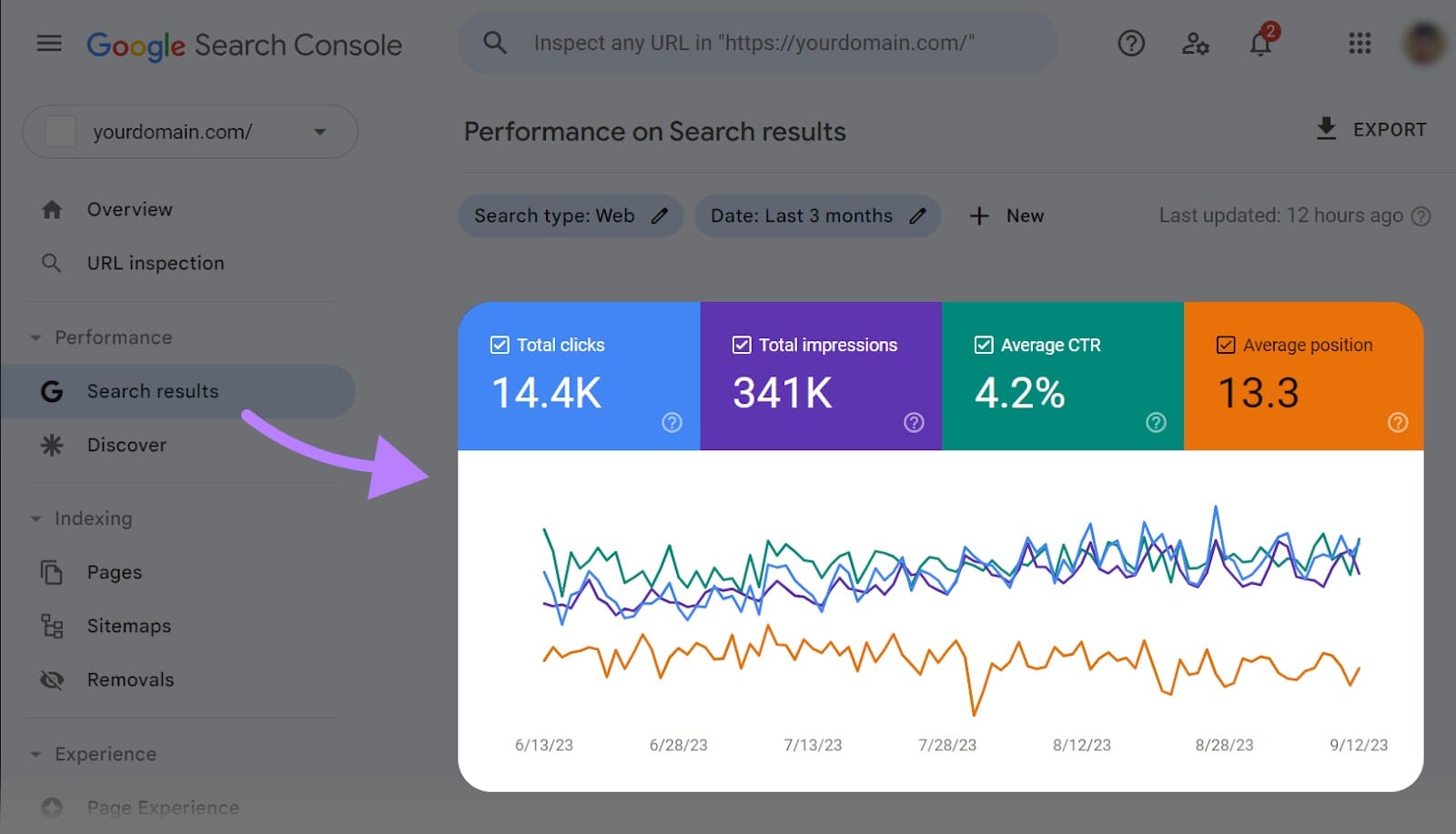
On the overview page, you’ll find the “Performance” chart that displays your website clicks. It’s a handy way to spot trends in your organic traffic.
The “Performance” graph is highlighted in the Google Search Console dashboard.
If you click on “Search Results” in the left-hand “Performance” category, you’ll see a more detailed chart that shows:
- All the clicks
- All the impressions
- Average click-through rate
- Typical position
Here’s a chart that displays “Total clicks”, “Total impressions”, “Average CTR”, and “Average position” from Google Search Console.
You can filter by certain dates or pages. Also, you can use the average position measure to keep track of how your search engine ranking changes after some time.
Benefits of Search Engine Positioning Best Practices
Having best practices doubles the benefits of search engine positioning. To begin with, kickstart with comprehensive keyword research to identify terms with high intent competition.
Tools like Google Keyword Planner give details into search volumes and trends.
Create pillar articles that cover wide topics deeply, supported by cluster content linking back. This topical authority notifies expertise to algorithms.
Having regular content on the site keeps information fresh, encouraging repeat crawls.
Monitor competitor moves to identify gaps and opportunities to power your business online.
Focus on E-A-T (Expertise, Authoritativeness, Trustworthiness) by displaying credentials and citations.
Best Practices of Search Engine Positioning Blogs
Blogs represent ideal cabs for applying search engine positioning best practices. Begin with audience analysis to understand pain points and interests.
Make titles that incorporate primary keywords while remaining trustworthy. Structure posts with clear hierarchies using headings and subheadings.
To keep people’s attention, incorporate multimedia components like photos and videos. Motivate individuals to share in order to create organic backlinks.
To keep the quality and taste of older posts up to date, add new content to them. Posting as a guest on popular websites increases exposure and link equity, which in turn boosts search engine rankings. Blogs can be transformed into lead generators and traffic magnets with these simple changes.
Search Engine Positioning Framework and Layout
A solid framework structures efforts systematically. Phase one involves auditing current performance using tools like Google Search Console. Identify strengths, weaknesses, and quick wins.
Phase two focuses on on-page optimisation, refining content and technical elements. Off-page strategies in phase three build relationships for quality backlinks. Ongoing monitoring and iteration form the final phase.
Establish key performance indicators, including keyword ranks, conversion rates, and organic sessions. The ability to adjust to new algorithms is guaranteed by this iterative method.
Simple, well-labelled menus make navigating easier. Strategic placement of calls to action guides conversions. Whitespace and typography enhance readability, reducing cognitive load.
Mobile-first design prioritises touch-friendly elements. Both humans and bots benefit from breadcrumb trails, which help navigate site hierarchies more efficiently.
Internal structure is reinforced by footer links to important pages. Both the number of visitors and their level of satisfaction are improved by these layout choices.
Search Engine Positioning Method on Google and Bing
Proven methods combine data-driven decisions with creative execution. Semantic keyword grouping creates content that covers related concepts comprehensively. Long-tail phrases capture specific intent with less competition. Voice search optimisation incorporates natural language patterns. Featured snippets are designed to provide ordered answers in formats that are list-based and structured.
Rough drafts are refined with the assistance of artificial intelligence, while human oversight is maintained to ensure authenticity.
A/B testing variations are used to check which elements are performing the best. Application that is methodical results in progress that can be measured.
As a result of Google’s dominant market share, platform-specific strategies are absolutely necessary.
Adhere to Webmaster Guidelines to avoid penalties. Utilise Google My Business for local visibility.
Rich snippets via structured data markup increase click-through rates. Core Web Vitals optimisation addresses loading, interactivity, and stability metrics.
Index coverage reports reveal technical issues promptly. These Google-focused methods align with the ecosystem’s nuances for superior outcomes.